

Open source · Apache-2.0 · v0.1.0

Google Cloud APIs on your laptop. Verified, not assumed.

CloudBurrow runs a local Kubernetes cluster that speaks Google Cloud APIs. Point the official Google client libraries at it and build without deploying for every change.

macOS and Linux, arm64 and amd64. Needs Docker, kind and kubectl. Windows is not supported. macOS binaries in v0.1.0 are not yet signed or notarized.
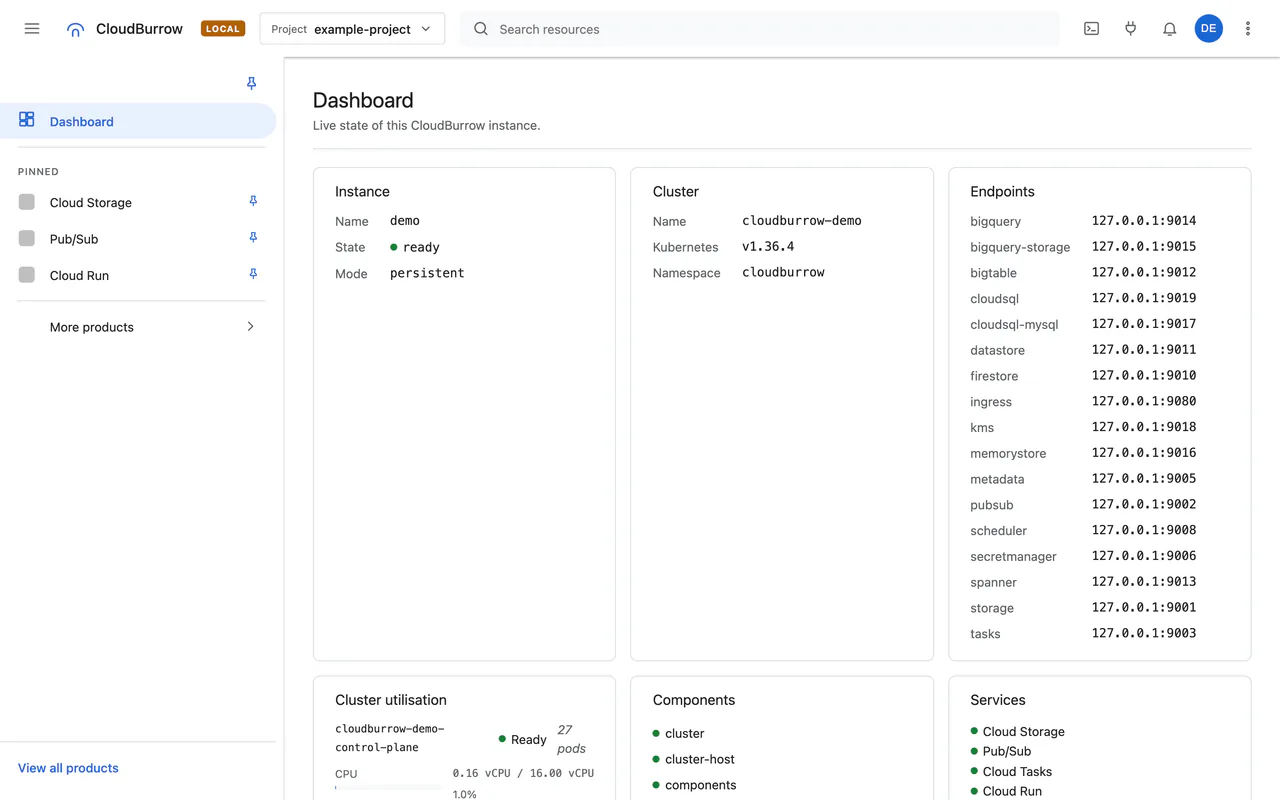
The CloudBurrow console dashboard, labelled LOCAL, with the enabled services and recent activity
The CloudBurrow console, captured 2026-09-28 from main @5da2bd0. Product icons hidden.
CloudBurrow in cross-section Above ground, the CloudBurrow door. Below it the cloudburrow CLI and a kind cluster with 5 default services (Cloud Run, Pub/Sub, Cloud Storage, Cloud Tasks, Secret Manager) and 6 opt-in services (Firestore and Datastore, Spanner and Bigtable, BigQuery, Cloud SQL and Memorystore, Cloud KMS, Cloud Scheduler and Cloud Logging). The Kubernetes API, for kubectl and helm, sits on the same gallery. A request travels from the door to Cloud Storage, then Pub/Sub, then Cloud Run, then back to Cloud Storage. kind cluster cloudburrow CLI Cloud Run Pub/Sub Cloud Storage Cloud Tasks Secret Manager Kubernetes API kubectl, helm opt-in Firestore andDatastore opt-in Spanner andBigtable opt-in BigQuery opt-in Cloud SQL andMemorystore opt-in Cloud KMS opt-in Cloud Scheduler andCloud Logging CloudBurrow in cross-section Above ground, the CloudBurrow door. Below it, the 5 services that start by default: Cloud Run, Pub/Sub, Cloud Storage, Cloud Tasks, Secret Manager. Cloud Run Pub/Sub Cloud Storage Cloud Tasks Secret Manager
Terminal
brew install cloudburrow/tap/cloudburrowcloudburrow up# in another shelleval "$(cloudburrow env)"

What runs

Five services start by default. More start when you ask for them. Each card says what backs it, because that decides how far you can trust it.

Cloud Run

Backed by Knative Serving behind a Cloud Run v2 adapter

Deploys real containers. Configuration the adapter cannot map is refused with the field named.

Pub/Sub

Backed by Google's own emulator

Topics, subscriptions, publish, pull, StreamingPull and push.

Cloud Storage

Backed by CloudBurrow's own server next release · v0.1.0 uses fake-gcs-server

Buckets, objects, versioning, lifecycle, CORS, XML multipart uploads and notifications to Pub/Sub.

Cloud Tasks

Backed by CloudBurrow

Queues and tasks, pause and resume, HTTP dispatch with retry.

Secret Manager

Backed by CloudBurrow

Secrets and versions over gRPC and JSON. Not a secret store: nothing is authenticated.

Start more with --services

  • Firestore, Datastore, Bigtable and Spanner (Google's emulators)
  • BigQuery (community emulator)
  • Cloud SQL for PostgreSQL and MySQL (real engines)
  • Memorystore (Valkey)
  • Cloud KMS
  • Cloud Scheduler
  • Cloud Logging

Resource Manager projects are always on, so gcloud projects list and Terraform's google_project work.

All services and their limits

A real Kubernetes cluster underneath

cloudburrow up creates a kind cluster in Docker. It starts Google's own emulators where they exist and CloudBurrow's own services where they don't, then wires them together. Because it is real Kubernetes, kubectl, Helm charts and operators work against it directly.

cloudburrow up creates the cluster and starts the services. It never touches your current kubecontext.

cloudburrow env exports endpoint overrides, the project, a local metadata server and a generated ADC file, as shell, JSON, Terraform or docker-compose.

Your app uses the official Google client libraries, unmodified. So does the Cloud Run worker inside the cluster.

Watch it in the local console, or with kubectl.

  1. cloudburrow up creates the cluster and starts the services. It never touches your current kubecontext.
  2. cloudburrow env exports endpoint overrides, the project, a local metadata server and a generated ADC file, as shell, JSON, Terraform or docker-compose.
  3. Your app uses the official Google client libraries, unmodified. So does the Cloud Run worker inside the cluster.
  4. Watch it in the local console, or with kubectl.
How CloudBurrow fits together On your machine: the official SDKs; the cloudburrow CLI, which runs cluster lifecycle, Cloud Tasks, Secret Manager, Cloud Run v2 adapter, metadata server + ADC, web console; and kubectl and helm. Across the ground line, in the kind cluster: Cloud Storage (CloudBurrow's server, next release; v0.1.0: fake-gcs-server); Pub/Sub (Google's emulator); Cloud Run (Knative Serving); Firestore, Datastore, Bigtable, Spanner (Google's emulators, opt-in); BigQuery (community emulator, opt-in); Cloud SQL (PostgreSQL and MySQL, opt-in); Memorystore (Valkey, opt-in); local AI runtime (opt-in); Kubernetes API (direct). The SDKs call the services in the cluster; kubectl and helm talk to the Kubernetes API directly. Each part is tagged ours when CloudBurrow builds it and upstream when it is integrated. your machine kind cluster official SDKs Google's client libraries, unmodified upstream cloudburrow CLI ours cluster lifecycle Cloud Tasks Secret Manager Cloud Run v2 adapter metadata server + ADC web console kubectl / helm upstream Cloud Storage CloudBurrow's server, next release; v0.1.0: fake-gcs-server ours Pub/Sub Google's emulator upstream Cloud Run Knative Serving upstream Firestore, Datastore, Bigtable, Spanner Google's emulators, opt-in upstream BigQuery community emulator, opt-in upstream Cloud SQL PostgreSQL and MySQL, opt-in upstream Memorystore Valkey, opt-in upstream local AI runtime opt-in upstream ours Kubernetes API direct upstream

A console you'll recognise, labelled LOCAL

cloudburrow up serves a web console laid out after the Google Cloud console, with a LOCAL badge on every screen. It is a view, not a second system: everything it shows is read through the same APIs your SDK calls, and a control appears only where the backend can perform it.

  • List and detail pages for every service, down to individual documents, rows, revisions and secret versions
  • Read-only SQL editors for Cloud SQL and Spanner; query builders for Firestore, Datastore and Bigtable
  • Kubernetes workloads, pods, nodes and storage, with metric history per node and per pod
  • A live Logs Explorer, and search across all of it
  • Light, dark and system themes. No CDN or web-font requests, so it works offline
  • A Cloud Shell-style terminal that runs in a pod, never on your machine next release

It is not pixel-identical to Google's console, and it has no billing, quota or IAM screens.

Tour the console

Vertex AI generation, offline

CloudBurrow serves a subset of generateContent and streamGenerateContent, verified with the official genai SDK on both the Vertex AI and Gemini API paths. It also serves Google's custom prediction contract (AIP_* routes, instances in, predictions out) on its own runtime.

What the AI surface covers

One model runs today: a community conversion of Gemma (gemma-4-E2B-it), labelled as one everywhere it appears. It is not Gemini, and output quality is not claimed. Text only, one turn, CPU only. Embeddings are blocked (#41).

Every "supported" has a test behind it

Compatibility is recorded per operation, not per service. An operation becomes Verified only through a merged test that drives it through an official Google SDK. A curl script doesn't count. Everything else is labelled: Refused with the field named, Unimplemented with a real UNIMPLEMENTED error, Not served, or Unknown. The coverage table is generated from the APIs' proto definitions, and CI fails if it goes stale.

"An emulator that quietly returns plausible responses is worse than one that returns a clear UNIMPLEMENTED."
CloudBurrow's compatibility rules
From Unknown to Verified An operation moves from Unknown to Served to Verified. The gate before Verified is a merged test through an official Google SDK; a curl script bounces off it, because it does not count. Off to the side, an operation that is not served returns UNIMPLEMENTED, and a field the adapter cannot map is refused with the field named. merged test through an official Google SDK curl does not count Unknown Not claimed: no test covers it Served Served, not yet verified Verified Verified Returns UNIMPLEMENTED Refused, field named
Generated from docs/coverage at 63e11c6 (v0.1.0) and 82a2eb9 (main), 2026-09-28.
ServiceVerified in v0.1.0Verified on main
Cloud Run Cloud Run: 8 Verified of 41 Cloud Run: 18 Verified of 41
Pub/Sub Pub/Sub: 18 Verified of 25 Pub/Sub: 33 Verified of 35
Cloud Storage Cloud Storage: 15 Verified of 32 Cloud Storage: 34 Verified of 87
Cloud Tasks Cloud Tasks: 11 Verified of 16 Cloud Tasks: 15 Verified of 16
Secret Manager Secret Manager: 14 Verified of 17 Secret Manager: 15 Verified of 17

1. Upload an object

2. Notification to Pub/Sub

3. Cloud Run worker reads it

4. Writes a result

5. Result read back

Every step uses an official SDK. It runs on every merge.

  1. An object, example-uploads/hello.txt, is uploaded to Cloud Storage with an official SDK.
  2. The upload sends a notification to Pub/Sub, a message with its own id.
  3. A Cloud Run worker receives it and reads example-uploads/hello.txt, with an official SDK.
  4. The worker writes a result, results/hello.txt.
  5. The test reads results/hello.txt back with an official SDK. Every step uses an official SDK, and the flow runs on every merge.
Browse the compatibility matrix

Read this before you rely on it

A local emulator is for building and testing. These limits are deliberate or upstream. They are written down so you don't discover them in production.

  • No IAM enforcement, anywhere. Policies are stored, never evaluated. Do not use CloudBurrow to test whether your permissions are correct.
  • Knative is not Cloud Run. What the adapter cannot map is refused with the field named, never silently dropped.
  • Cloud KMS and Secret Manager are not security boundaries. KMS key material is stored unencrypted.
  • Pub/Sub state does not survive a restart. It is a limitation of Google's emulator, and it was measured.
  • No GKE management APIs. CloudBurrow runs your workloads on its own kind cluster; the GKE cluster-management API is not emulated.
  • BigQuery is a community emulator. One project, nothing kept across a restart.
The full list, in docs/status.md

From zero to your first call

  1. 1 Install

    Homebrew

    Homebrew
    brew install cloudburrow/tap/cloudburrowcloudburrow version

    Install script

    Install script
    curl -fsSL https://raw.githubusercontent.com/cloudburrow/cloudburrow/main/scripts/install.sh | sh

    It verifies the SHA-256 checksum and, when gh is installed, the GitHub build attestation. It refuses an archive it cannot verify.

    From source

    From source
    git clone https://github.com/cloudburrow/cloudburrow.gitcd cloudburrowmake build

    A plain go install build has no embedded Storage server, and up refuses it. Use make build.

    Needs Docker (4 CPU / 6 GB), kind v0.33.0 and kubectl. macOS and Linux only; Windows is unsupported and WSL2 is untested. macOS binaries in v0.1.0 are not yet signed or notarized (#605). The console opens at http://127.0.0.1:9090 and is labelled LOCAL.

  2. 2 Check

    Terminal
    cloudburrow doctor

    cloudburrow doctor changes nothing, and fails only on what would stop up.

  3. 3 Run

    Terminal
    cloudburrow up# in another shelleval "$(cloudburrow env)"
  4. 4 Call it

    Python · Cloud Storage
    import uuid
    from google.cloud import storage
    
    client = storage.Client()
    bucket = client.create_bucket(f"example-{uuid.uuid4().hex[:12]}")
    bucket.blob("hello.txt").upload_from_string("hello")
    assert bucket.blob("hello.txt").download_as_text() == "hello"
    bucket.delete(force=True)
    

    This block is run by CloudBurrow's Python suite in CI. If it stops working, CI fails. docs/examples/python.md

    Node.js · Cloud Storage
    import assert from 'node:assert/strict';
    import { randomUUID } from 'node:crypto';
    import { Storage } from '@google-cloud/storage';
    
    const apiEndpoint = process.env.STORAGE_EMULATOR_HOST;
    delete process.env.STORAGE_EMULATOR_HOST;
    const storage = new Storage({ apiEndpoint, projectId: process.env.GOOGLE_CLOUD_PROJECT });
    
    const [bucket] = await storage.createBucket(`example-${randomUUID()}`);
    await bucket.file('hello.txt').save('hello', { resumable: false });
    const [data] = await bucket.file('hello.txt').download();
    assert.equal(data.toString(), 'hello');
    await bucket.deleteFiles({ force: true });
    await bucket.delete();
    

    This block is run by CloudBurrow's Node.js suite in CI. If it stops working, CI fails. docs/examples/node.md

    Go is tested through CloudBurrow's own compatibility suite. Java, .NET, Ruby and PHP are untested.

macOS binaries in v0.1.0 are not signed or notarized (#605). See Gatekeeper in docs/install.md.

Build against Google Cloud APIs, locally

Free and open source under Apache-2.0. No account, no sign-up, no Google Cloud bill.

Get started